

Invite a subcontractor
In Matterial you can give your subcontractor their own window into the job: they log their estimates, upload receipts, and check what they're owed—without ever seeing your budget, your margins, or the other subcontracts. The invite goes out from the subcontract card itself, on the Subcontracts and estimates screen, and lands in their inbox as an access link. Here's how to do it.
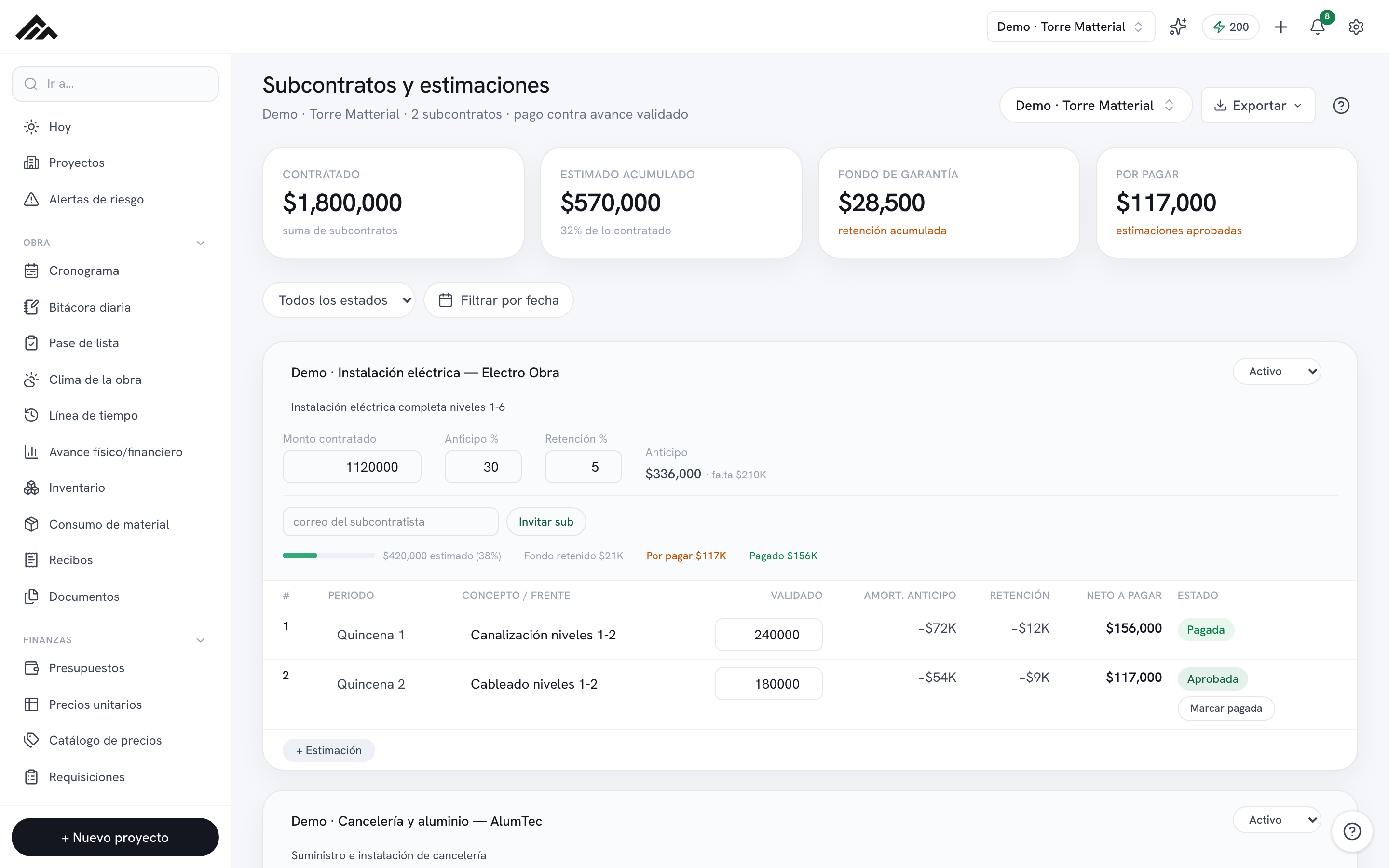
- The invite lives inside each subcontract card, under Subcontracts and estimates (/estimaciones), in the Finances group.
- The subcontractor gets an access link by email; opening it drops them into their own space, /mi-subcontrato.
- They only see THEIR subcontract and their estimates—never your budget, your margins, or the other subcontracts (real row-level isolation, not just a hidden screen).
- From there they can log their estimates, upload receipts, and create requisitions.
- Inviting and managing subcontracts doesn't use any AI credits.
- 1
Open Subcontracts and estimates and pick the job
Head into the Estimates module (Finances group). Up in the top-right project picker, choose the job where the subcontract lives. Each job keeps its own subcontracts.
- 2
Create or open the subcontract
If it doesn't exist yet, click Add subcontract and type who the contract is with. Then, on the card, type the scope and enter the Contract amount, Advance %, and Retention %. That sets up everything the sub will see.
- 3
Enter the subcontractor's email
Below the contract parameters, in the strip set off by a divider line, you'll find a field labeled "subcontractor's email." Type in the address you want them to sign in with.
- 4
Click Invite sub
When you press the Invite sub button, an "Invitation sent" notice pops up and an access link goes out to that email. Right next to it you get the same link to copy or send over WhatsApp, in case the email doesn't arrive. The email stays tied to the subcontract even before the sub opens it. If the invitation can't go out, the notice tells you why (for example, that email already belongs to someone on your team). Once inside, the sub gets a notification whenever you validate or reject their progress, approve or pay their estimates, or record a payment for them.
- 5
Confirm they have access
Once the subcontractor opens the link and accepts, the email field turns into a tag reading "✓ Sub with access · their email." From then on, they work out of /mi-subcontrato, scoped to just their part.
Frequently asked questions
What can the subcontractor see once they're in?
Only their subcontract and their estimates, plus the receipts and requisitions they upload themselves. They can't see your budget, your margins, or the other subcontracts on the job. It's real row-level isolation, not just a screen permission.
What if the invitation email never arrives?
Access travels as a link in an email. If it doesn't show up, ask them to check their spam folder, make sure the address is spelled right on the card, and hit Invite sub again. The email stays tied to the subcontract in the meantime.
Does inviting a subcontractor burn AI credits?
No. Inviting subs and running your subcontracts and estimates works without AI. Your company's monthly credit pool is only tapped by features that actually use AI.