

Unit prices and matrices (APU)
Unit prices is the OPUS-style heart of Matterial: here every concept in your budget can carry its own APU matrix — materials, labor, equipment, tools and auxiliaries — and the unit price is figured for you, down to the cent. The module is split into four tabs: Concepts & matrices (build the matrix and apply the unit price), Resource breakdown (everything the whole job needs, added up), Catalog (your price memory for resources) and Percentages (the cascade of overhead, financing, profit and VAT). It all runs without AI and without spending credits.
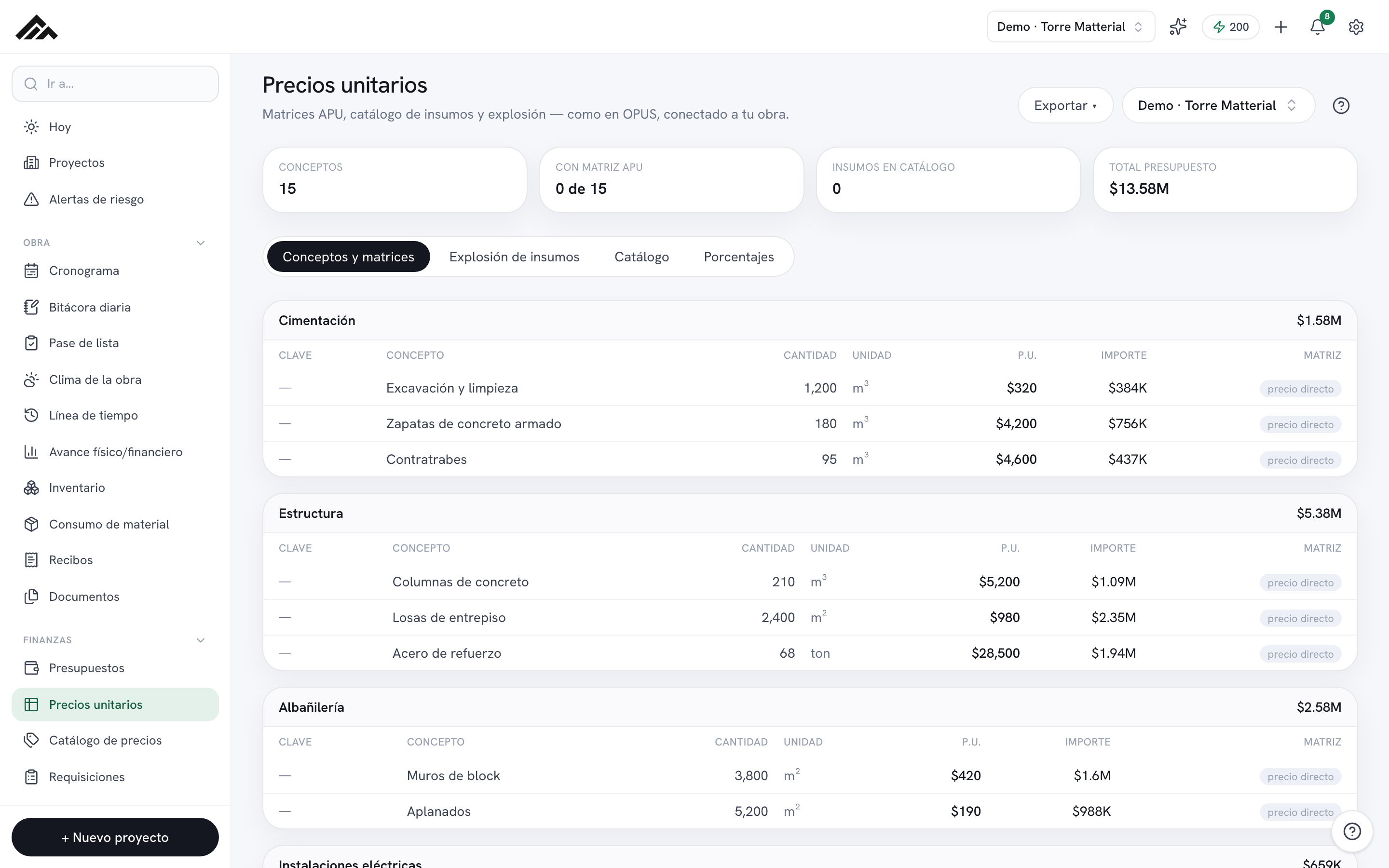
- Every concept carries its own APU matrix and the unit price is figured automatically by the same engine validated to the cent against OPUS; you decide when to apply it to the budget.
- The resource catalog belongs to the whole company: it's your shared price memory, so changing a resource's cost ripples into every matrix that uses it, across all your projects.
- The Percentages tab is the cascade that turns direct cost into the unit price: overhead on the direct cost; financing, profit and charges on the subtotal; and VAT according to the project's regime.
- The Resource breakdown adds up how much material, labor and equipment the entire job needs, expanding the recipes of your composite resources.
- The calculations, importing your price list from Excel and exporting to .xlsx are all deterministic: they don't burn any AI credits.
- 1
Pick the project and find your concepts
Up in the top right, use the project selector to open the job you're working on. In the Concepts & matrices tab you'll see your line items grouped together, each row showing its code, quantity, unit, unit price and amount. If the project has no concepts yet, use Go to Budgets or Import from OPUS to bring them in.
- 2
Open a concept and build its APU matrix
Click any row to open the editor. In the APU matrix view, add resources by section (Materials, Labor, Equipment…) with "+ resource", typing in the quantity. For Labor and Equipment you can enter the output rate, just like OPUS (6 m³ per shift), and the quantity is worked out for you; minor tools go in as a % of labor, with no cost. Starting from an empty matrix? Use "Copy matrix from another concept" — even from a different project — and tweak it. Down below you'll see the cascade and the unit price calculated live.
- 3
Tune the percentage cascade
In the Percentages tab, enter Office and Field overhead (on the direct cost), Financing, Profit and Additional charges, and pick the project's VAT regime (standard 16%, border region 8%, residential housing 0%); outside Mexico, the tax starts out at the rate your company set in Settings → Currency & format, and you can change it per project. This works just like OPUS: it's what turns each matrix's direct cost into a unit price. Hit Save and recalculate unit price to push the change down to the concepts that follow their matrix; if any has a unit price you typed by hand, we ask before touching it.
- 4
Apply the unit price to the budget
The matrix's unit price isn't saved on its own. In the editor, hit Apply to budget, or tap the ↻ button that shows up next to the price when the matrix returns a different number. If you see the warning about concepts whose unit price differs from their matrix, use Recalculate all: before writing anything it shows you the list (budget price → matrix price) and how much the total changes, and it only applies if you confirm.
- 5
Keep your resource catalog healthy
In the Catalog tab you search, edit costs inline and add resources with "+ Resource". Get going fast with the "Base catalog" or "Import price list" (Excel or CSV, no AI). Hit Edit to open a resource's panel, build its recipe if it's a composite (a crew, mortar) and see your suppliers' prices alongside what you've actually paid on real purchases.
- 6
Review the breakdown and export to Excel
The Resource breakdown tab adds up, by type, how much material, labor and equipment the whole job calls for. When you're ready to deliver, use Export ▾ to download, as .xlsx, the Budget (with VAT and the amount in words), the Unit price analyses, the Resource breakdown or the Equipment and tool list.
Frequently asked questions
Can I bring in my OPUS unit price analysis catalog?
Analyses live in a project's concepts, so in Import from OPUS upload the Budget report together with the Unit price analysis: each concept arrives with its matrix. If you only have the analysis catalog (no Budget), Matterial tells you so and offers to import its resources, with their cost, into your catalog; the Resource breakdown report contributes them too.
What is a "composite" resource, or one with a recipe?
It's a resource whose cost comes from others: a crew = a skilled worker + a laborer, mortar = cement + sand + water. In the Catalog, hit Edit on the resource and build its recipe (what it's made of and how much per unit). The breakdown expands it into its basics, and the "% of labor" lines are worth a fraction of the labor within that same recipe.
I changed a resource's cost — why didn't the concept's price update on its own?
The catalog and the matrices recalculate on the fly, but the unit price saved in the budget stays under your control so figures never move by accident. When you see the warning about concepts whose unit price differs from their matrix, use Recalculate all (or the ↻ button next to the price): first you see which concepts change and from what to what, and the new values are applied when you confirm.
Does Unit prices use AI credits?
No. Everything in this module — calculating the matrices and the cascade, importing your price list from Excel and exporting to .xlsx — is deterministic, no AI. Your monthly pool of credits stays untouched for the modules that do use artificial intelligence.