

Requisitions and live inventory
In Matterial, the field crew asks for the material and purchasing orders it, without anyone entering the same thing twice. You log a requisition the moment something runs short on site, one click turns it into a linked purchase order, and live inventory tells you what's left to buy without you doing the math. It's all deterministic: it works without AI and doesn't burn any credits.
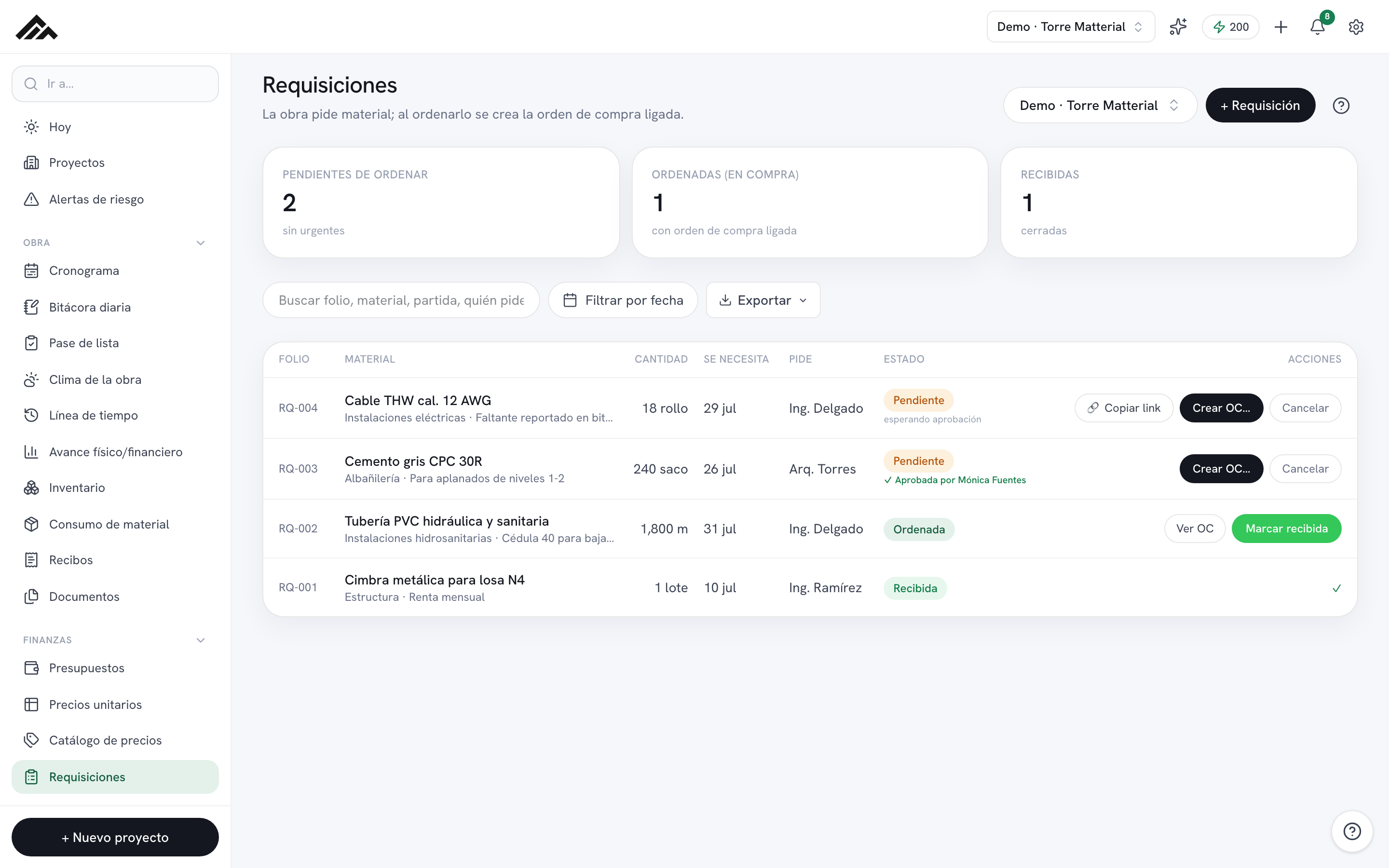
- The field asks, purchasing orders: every requisition starts out Pending and, once you create the PO, moves to Ordered with its purchase order linked.
- The number (RQ-001, RQ-002…) is assigned for you; all you type is the material, the quantity, and when it's needed.
- Need a sign-off? Generate an approval link and send it over WhatsApp: the manager or owner approves right from their phone, no account required.
- Live inventory (/inventario) builds itself from your cost matrices, requisitions, and purchases, and turns every shortfall into a requisition with one click.
- It's a deterministic module: it works without AI and doesn't draw from your company's monthly credit pool.
- 1
Log the requisition
In /requisiciones, pick the project up top and tap "+ Requisition." Type the material and the quantity (both required); if you like, add the unit, the "Needed by" date, the line item, who's requesting it, and notes for purchasing. When you hit Save, it starts out Pending with its automatic number, RQ-00X.
- 2
Keep an eye on what's pending and what's urgent
The three cards at the top sum up To be ordered, Ordered (in purchasing), and Received. Once a "Needed by" date rolls around, the row turns red with a ⚠ and the metric flags how many are "already needed on site." Use the search box (number, material, line item, requester) and the date filter to narrow the list.
- 3
Request approval, no account needed (optional)
On a Pending requisition, tap "Request approval": Matterial generates a link and copies it to your clipboard so you can send it over WhatsApp to whoever signs off. That person opens it on their phone, with no account, and signs with their name. You'll see "waiting for approval" and then "✓ Approved by…" or "✗ Rejected by…" on the row.
- 4
Turn it into a purchase order
Tap "Create PO…," pick the supplier (or type in a new one) and the negotiated unit price: you'll see the subtotal, the job's VAT (16%, or 8% in the border region), and the total instantly. The price is required, because an order at zero is not a purchase. When you Create order, the requisition moves to Ordered, is linked to the PO, and purchasing gets notified. A requisition rejected through the link can no longer be ordered.
- 5
Close the loop when it arrives
When the material shows up, log it on its order in /compras ("Receive material" or "Installments"). As soon as the order is Delivered, the requisition moves to Received on its own. If the order is cancelled or deleted, the requisition goes back to Pending so it can be ordered again. If something no longer applies, use "Cancel" and then "Delete."
- 6
Let inventory tell you what's missing
In /inventario the board builds itself: Required comes from your APU cost matrices (or from the requisitions if there are no matrices), Purchased and Received from your orders, and it works out the Shortfall and what's Still to receive. On every row tagged "Shortfall," tap "Requisition shortfall" and one click creates the requisition, ready for purchasing to order.
Frequently asked questions
What's the difference between a requisition and a purchase order?
The requisition is the field crew asking for material (it starts out Pending). The purchase order is purchasing buying it from a supplier. In Matterial the two stay linked: when you tap "Create PO…," the requisition moves to Ordered and ties to its PO, with nothing re-entered.
Can I create the order before I know the price?
No. The unit price is required: an order at zero doesn't count as a purchase and can't be paid. If you're still negotiating, leave the requisition Pending; and if the price changes later, edit the order in /compras with the pencil and VAT and total are recalculated for you.
Does this use up AI credits?
No. Requisitions and live inventory are deterministic modules: they work without AI and never touch your company's monthly credit pool. Credits are spent on the AI-powered features, not here.